hacking embedded systems
http://lwn.net/Articles/407459/
One of the scariest articles I have seen recently.
The linked PDF is nice too, but the article about it just flows better.
http://lwn.net/Articles/407459/
One of the scariest articles I have seen recently.
The linked PDF is nice too, but the article about it just flows better.
"I think part of a best friend's job should be to immediately clear your computer history if you die"
Awesome!
http://lwn.net/Articles/405810/
Lovely humour from a lady I'm starting to admire as much as JR (that's Joanna Rutkowska, not the zero-EQ JKR of Harry Potter fame).
There's no need to click the link unless you're a file systems maven though... the funny parts are right here:
----- quote -----
This series is the core mount and lookup infrastructure from union mounts, split up into small, easily digestible, bikeshed-friendly pieces. All of the (non-documentation, non-whitespace) patches in this series are less than 140 lines long. It's like Twitter for kernel patches.
VFS developers should be able to review each of these patches in 3 minutes or less. If it takes you longer, email me and I'll post a video on YouTube making fun of you.
I can't recall when was the last time Bruce Schneier said something I did not quite agree with. The last paragraph could have at least hedged a little, instead of making it sound so unequivocal. Oh well...
-------- Original Message --------
If you're a typical wired American, you've got a bunch of tech tools you like and a bunch more you covet. You have a cell phone that can easily text. You've got a laptop configured just the way you want it. Maybe you have a Kindle for reading, or an iPad. And when the next new thing comes along, some of you will line up on the first day it's available.
So why can't work keep up? Why are you forced to use an unfamiliar, and sometimes outdated, operating system? Why do you need a second laptop, maybe an older and clunkier one? Why do you need a second cell phone with a new interface, or a BlackBerry, when your phone already does e-mail? Or a second BlackBerry tied to corporate e-mail? Why can't you use the cool stuff you already have?
More and more companies are letting you. They're giving you an allowance and allowing you to buy whatever laptop you want, and to connect into the corporate network with whatever device you choose. They're allowing you to use whatever cell phone you have, whatever portable e-mail device you have, whatever you personally need to get your job done. And the security office is freaking.
You can't blame them, really. Security is hard enough when you have control of the hardware, operating system and software. Lose control of any of those things, and the difficulty goes through the roof. How do you ensure that the employee devices are secure, and have up-to-date security patches? How do you control what goes on them? How do you deal with the tech support issues when they fail? How do you even begin to manage this logistical nightmare? Better to dig your heels in and say "no."
But security is on the losing end of this argument, and the sooner it realizes that, the better.
The meta-trend here is consumerization: cool technologies show up for the consumer market before they're available to the business market. Every corporation is under pressure from its employees to allow them to use these new technologies at work, and that pressure is only getting stronger. Younger employees simply aren't going to stand for using last year's stuff, and they're not going to carry around a second laptop. They're either going to figure out ways around the corporate security rules, or they're going to take another job with a more trendy company. Either way, senior management is going to tell security to get out of the way. It might even be the CEO, who wants to get to the company's databases from his brand new iPad, driving the change. Either way, it's going to be harder and harder to say no.
At the same time, cloud computing makes this easier. More and more, employee computing devices are nothing more than dumb terminals with a browser interface. When corporate e-mail is all webmail, corporate documents are all on GoogleDocs, and when all the specialized applications have a web interface, it's easier to allow employees to use any up-to-date browser. It's what companies are already doing with their partners, suppliers, and customers.
Also on the plus side, technology companies have woken up to this trend and -- from Microsoft and Cisco on down to the startups -- are trying to offer security solutions. Like everything else, it's a mixed bag: some of them will work and some of them won't, most of them will need careful configuration to work well, and few of them will get it right. The result is that we'll muddle through, as usual.
Security is always a tradeoff, and security decisions are often made for non-security reasons. In this case, the right decision is to sacrifice security for convenience and flexibility. Corporations want their employees to be able to work from anywhere, and they're going to have loosened control over the tools they allow in order to get it.
This essay first appeared as the second half of a point/counterpoint with Marcus Ranum in Information Security Magazine. You can read Marcus's half here.
http://threatpost.com/en_us/blogs/effect-snake-oil-security-090710
it's just a coincidence that the author's nickname is "rsnake" :-)
he makes a valid point, but as the comments show, not everyone agrees. The most useful comment is the one that says "aah but this will apply equally to non-snake oil remedies" or some such... worth thinking about
...is always fun. Even more so when it happens on otherwise staid and
sedate sites like LWN:
http://lwn.net/Articles/404259/
----
Broadcom releases an open-source driver for its wireless chipsets
Posted Sep 9, 2010 16:09 UTC (Thu) by djcapelis (subscriber, #53964)
Parent article: Broadcom releases an open-source driver for its
wireless chipsets
Oh my!
This is an amazing development. One of the last problems with a
macbook I was having was a broadcom chip.
--
Posted Sep 9, 2010 16:39 UTC (Thu) by lkundrak (subscriber, #43452) [Link]
The last one is being a macbook I presume ;)
http://groups.google.com/group/vim_dev/msg/7e494fa0fe6cc732
If Bram, author of vim, cannot do some simple version cutovers in Hg, is it really that easy to use?
The other thread at http://groups.google.com/group/vim_dev/browse_thread/thread/1ce709f61e5424e5/f70ea0132796c96a?hide_quotes=no#msg_f70ea0132796c96a is even more illustrative (and, as a friend on #git said, too fatiguing to read).
Branching it seems is still a mess in Hg...
This shows how to use tig and the new option in rebase to do fixups very quickly.
What you need first is this line in your ~/.gitconfig:

type 's' for status view, then cursor down to the file that you just changed

type 'u' to stage that file

type 'q' to quit status view and go back to main view; cursor down to the
commit you want to "fixup"

hit enter to make sure it is the right one; it is... the filelist confirms it

hit 'q' to get rid of the commit details, then '=' to invoke the "git fixup"

Notice the commit message?
hit enter to get past that commit confirmation message, then arrow down 1 line
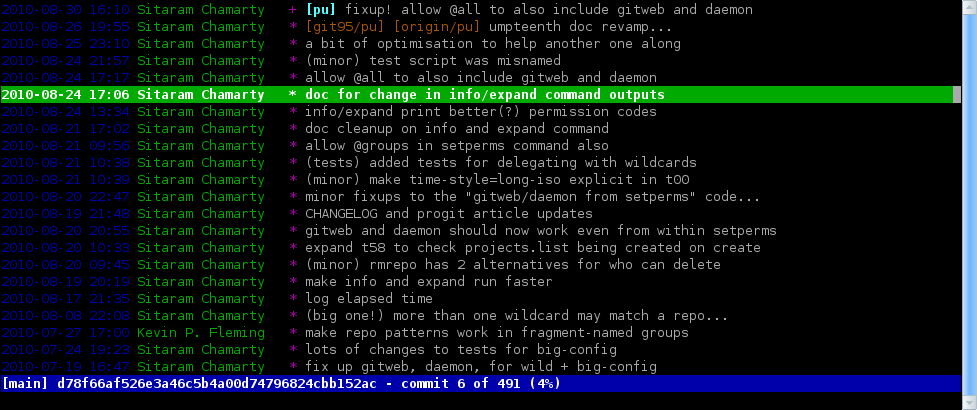
hit "R" to rebase with respect to the selected commit

save and exit the editor

hit enter to see the new commits

I have switched my laptop over to Fedora 13 LXDE to check things out properly in normal use; here are my findings so far. (Remember I have > 10 years of history as a Mandriva user!)
Plus points
keychain ~/.ssh/id_rsa
. ~/.keychain/$HOSTNAME-sh
. ~/.keychain/$HOSTNAME-sh-gpg
So today my young colleague Vignesh and I spent some time figuring out how to put more than one live CD onto a USB stick. Without using any external tools (except "unetbootin").
In brief:
and you're done.
----
Unless one of the live CDs you want is Mandriva :-(
God what a pain. First of all, without initrd tweaking it cannot be "unetbootin"-ed. This is because the extlinux.conf entries don't come with UUID= options, so unless it's the first partition it won't get past that. Worse, the "linuxrc" file inside the initrd.gz hardcodes"-t iso9660". Come on.... why? The mount command should be able to figure out the partition type dammit!
What Vignesh finally did to make it work was
And that seemed to work for me too.
Once.
After that it never worked again (back to sqshfs errors). And after a couple more attempts I just gave up... Mandriva is not really worth it as a quick-check-your-email-on-a-borrowed-laptop live CD anyway so there's no point:
----
Looks like my MDV days may be numbered, and not just because I promised a friend of mine (who favours Fedora) that I'd switch to Fedora if they start using gitolite either. Sad... The future looks Fedora-ish blue for my machines and minty-green for the ones I manage for my non-tech f&f.
